BREAKING NEWS

Welcome to AGUMA Online

Showing posts with label Android. Show all posts

Saturday, 23 February 2019

*** How to secure WhatsApp messages with fingerprints or face in iPhone ***

How to secure WhatsApp messages with fingerprints or face in iPhone


These are steps to secure WhatsApp  messages via a fingerprint or face :
- Go to Application Settings.
- Clicking "Account".
- Select "Privacy".
- Click on "Screen Lock" and choose the fingerprint or face sensor as appropriate for your phone.


*** Galaxy S 10 Plus: Specifications & Features ***

Galaxy S 10 Plus: Specifications & Features 


Samsung Electronics announced today its new  Galaxy S 10 Plus, during a major event held by the South Korean company in San Francisco, California to discover the Galaxy S10 series, Samsung supplied its new Galaxy S10 Plus With three rear cameras and two front camcorders, and a fingerprint sensor integrated into the screen, for the first time on a smartphone provided by the company.

This is a summary of the highlights of the Galaxy S10 Plus:
* It is equipped with three rear cameras, including a very wide angle camera.
* It comes with two front cameras for Selfie.
* The first smartphone with the UltraSonic sensor is integrated into the screen.
* The first smartphone supports Wi-Fi 6.
* Ability to customize the sidebar for quick access to any application.
* Large battery capacity 4100 mAh.
* Water resistance support + Traditional speaker port.
* Up to 1TB of internal storage can be increased to 1.5TB through external memory cards.
* RAM up to 12 GB.
* Wireless reverse charging for other devices.
What are the specifications of Galaxy S10 Plus?
Specification                        Galaxy S 10 Plus
The screen                            6.4 inches in HD + QHD with a density of 522 pixels/inch with 19: 9 dimensions
 processor                             9820 from Samsung or Snapdragon 855 from Qualcomm
  OS                                       Android  9.0 Pie with OneUI interface
The rear camera                 12 megapixels with a variable lens slot of F1.5 / F2.4
                                              12 megapixels with F / 2.4 lens slot
                                              16 megapixels with an F / 2.2 lens at a very wide angle of 123 degrees
The front camera                10 megapixels + 8 megapixels
The battery                          4100 mAh
RAM                                     8 or 12 GB
Storage                                 128, 512 GB, or terabyte
Dimensions                          157.6 � 74.1 � 7.8 mm
Weight                                 175 gr
Colors                                  white, black, yellow, pink, blue, green
Additional features            Integrated fingerprint sensor + Wi-Fi support + 6 wireless reverse charging

Sunday, 13 January 2019

*** How to use YouTube's Take a Break feature ***

How to use YouTube's Take a Break feature

In 2018, Google and Apple discharged instruments intended to enable clients to acknowledge exactly how much time they spend utilizing their cell phone.

Google has its Digital Wellbeing activity, and Apple has Screen Time. Outside of Google's instrument that requires one of Google's Pixel telephones, the organization has likewise invested energy incorporating comparative highlights with different administrations.

For YouTube, there's a component considered Take a Break. An update is activated after a set measure of time of constant gushing in the YouTube application is come to.

You'll have to empower the component in the YouTube application on your telephone.

Android 

How to use YouTube's Take a Break feature

Android clients should go to the YouTube application > select their profile symbol > Time watched > Remind me to take a break. In the wake of choosing the enjoy a reprieve choice, a provoke will show up asking how frequently you need to be helped to remember your survey propensities.

iOS 

How to use YouTube's Take a Break feature

iOS clients should go to the YouTube application > select their profile symbol > Time watched > Remind me to take a break. In the wake of choosing the enjoy a reprieve choice, a provoke will show up asking how frequently you need to be helped to remember your review propensities.

How to use YouTube's Take a Break feature

Going ahead, when you hit your purposeful time limit in the YouTube application, an alarm will show up reminding you it's a great opportunity to take a break. At the point when the alarm appears, you can either alter the measure of time between interferences or expel it and keep viewing a video.

Friday, 28 December 2018

*** Samsung Galaxy Note 9 the best Phone ***

Samsung Galaxy Note 9 the best Phone


Samsung Galaxy Note 9 the best Phone

The Good The Samsung Galaxy Note 9 is a major, excellent telephone with best level specs including an enormous battery and inner stockpiling that begins at 128GB. The new S Pen serves as a remote for taking long-remove selfies.

The Bad It's costly and offers a couple of genuine advancements over a year ago's Note 8. The unique mark peruser is awkwardly near the camera.

The Bottom Line The ultrapricey Note 9 is one of the year's best telephones. Be that as it may, except if you're in desperate need of an update, the keen move is to sit tight for what the following iPhone, Pixel and even Galaxy S10 bring.


You can purchase The Galaxy Note 9 at Samsung's site, and nearby bearer stores and retailers.

I grabbed the Galaxy Note 9, flew out the S Pen stylus and began to compose on the dark screen in tart lemon-shaded computerized ink. It hit me: This telephone is more enjoyable to use than your telephone. When I'm utilizing the Note 9, I feel progressively motivated to compose, draw, take exact screen captures utilizing the device, snap selfies with the S Pen's remote shade, and energetically explain photographs to send to companions.

Be that as it may, the Note 9 is no negligible toy. It's likewise amazing as heck, with a 6.4-inch screen, 4,000-mAh battery, Qualcomm Snapdragon 845 processor and either 128GB or an astounding 512GB (!!!) of locally available capacity, in addition to a microSD card on the off chance that you need increasingly, progressively, more.

However the effervescing inquiry at the focal point, all things considered, the one that is beating ceaselessly at your dark issue, is this: Are the power and fun of Samsung's new Galaxy Note 9 worth $1,000 of your well deserved money? (That is �899 and AU$1,499 - or $1,250, �1,099 and AU$1,799 for the 512GB adaptation.) It's a similar inquiry Apple fans have been asking themselves since the iPhone X initially hit the $1,000 check a year ago.

For Android fans who need the best, the appropriate response is "yes."

Thursday, 13 December 2018

*** How to turn-off the annoying sounds in the Facebook apps ***


How to turn-off the annoying sounds in the Facebook app


For reasons that are indistinct to anybody outside of Facebook, the iOS and Android applications make a huge amount of commotion. There's a sound when you revive your feed, when somebody begins composing or when you get another alarm. What's more, to be honest, the sounds are irritating.

Fortunately, you can disable the in-application sounds in only seconds.

Disable on iOS

How to turn-off sounds in the Facebook app

On an iOS gadget, tap on the catch with three lines in the base right corner of the application. Next, look down and tap on the dropdown named Settings and Privacy at that point select Settings. Look through the rundown of Settings until the point when you discover the Sounds choice and tap it. At long last, slide the change alongside In-Application Sound to the Off position.

Disable on Android


How to turn-off  sounds in the Facebook app


The procedure on an Android gadget is like iOS. Open Facebook and tap on the three-lined symbol along the highest point of the screen. Look down until the point that you discover Settings and Privacy, select it, at that point tap on Settings. Next select Media and Contacts and after that flip Sounds in the application to the Off position.

Friday, 7 December 2018

*** Top 5 eBook Apps for Android ***

Top 5 eBook for Android Apps


Android telephones and tablets are phenomenal gadgets for eBook perusing. You can get free applications for your Android gadget that you can use to peruse your eBooks from the significant sources including Amazon, Barnes and Noble, and Kobo. You can likewise peruse eBooks on Android that you download from some other store. The following are the main 5 most mainstream eBook applications for Android. 

1. Amazon Kindle Android App 

The Kindle App for Android gives you a chance to peruse the majority of your Kindle eBooks on an Android gadget, regardless of whether you don't possess a Kindle eReader. In the event that you do have a Kindle, you can peruse your eBooks on both the Kindle and Android gadget. Your perusing advancement will be adjusted between the gadgets with Amazon's "Whispersinc" innovation. Like the Kindle itself and other Kindle applications, you can get to free substance and download eBooks for $9.99. 

Download: Search for "Fuel" in the Android Market. 

Android OS Version Supported: Android OS 1.6 or higher. 

digital books Supported: Amazon Kindle eBooks in the AZW design that are just sold at Amazon.com. 

2. Barnes and Noble Nook Android App 

The Android Nook App from Barnes and Noble gives you a chance to peruse the majority of the Nook eBooks on your Android gadget without owning a Nook eReader. Barnes and Noble's Nook framework is extraordinary in that it will give you a chance to loan content with their "LendMe" programming. You can likewise test any of the Nook books for nothing before you purchase. 

Download: Search for "Niche" in the Android Market. 

Android OS Version Supported: Android OS 1.6 or higher. 

digital books Supported: If you need to peruse utilizing the Nook App, at that point you ought to get eBooks from Barnes and Noble's Nook store. 

3. Sony Reader Android App 

The Sony Reader Android application comes pre-stacked with three exemplary titles and three passages from top of the line eBooks. You can synchronize your perusing position, bookmarks, and features to Reader Daily Edition (PRS-950SC with firmware 2.0). Like alternate applications, you can likewise peruse Sony Reader eBooks regardless of whether you don't have a Sony Reader. 

Download: Search for "Sony Reader" in the Android Market. 

Android OS Version Supported: Android OS 2.2 or higher. 

digital books Supported: If you need to peruse Sony Reader eBooks on your Android gadget, get them from Sony's "Peruser Store". 

4. Kobo eReader Android App 

With the Kobo Android application, you can purchase eBooks from inside the application and download them straightforwardly to your telephone. Take your whole library with you in a hurry. You can discover the majority of your most loved titles and writers in Kobo's extensive eBook determination. 

Download: Search for "Kobo" in the Android Market. 

Android OS Version Supported: Android OS 1.6 or higher. 

digital books Supported: If you need to utilize the Kobo Android application, you ought to download eBooks from the KoboBooks site. 

5. Aldiko Android App 

The Aldiko Android App gives eBook sweethearts an option to applications from the greater book organizations recorded previously. With Aldiko, you are not bolted into one eBook store. Rather, you can purchase eBooks from any eBook retailer that moves Adobe PDF or EPUB eBooks. You can download eBooks straightforwardly to your gadget without expecting to utilize your PC. Import your very own substance and make your very own eBook indexes. 

Download: Search "Aldiko: in the Android Market. 

Android OS Version Supported: Android OS 2.1 or higher. 

digital books Supported: The Aldiko Book Reader bolsters Adobe-DRM ePub and PDF and additionally non-scrambled ePub and PDF positions. You can go anyplace ePub and PDF eBooks are sold or accessible for nothing. You can likewise get eBooks from your open library (where upheld). 

These applications are strong answers for eBook perusing. Pick the one that will work best for you dependent on the eBook peruser or cell phone that you claim, and the eBooks that you've just bought and downloaded.

*** Why Should You Invest in Android Application? ***

Why Should You Invest in Android Application?


To be completely forthright, a portable application is a what tops off an already good thing for the client encounter, while calls and instant messages are the preeminent elements of a cell phone. By and by, an application can turn into the highest need for a man, in the event that it is connecting enough. A versatile application can make mark faithfulness and help you from falling behind in the aggressive market. In actuality, the clients need their most loved brands and organizations to build up their very own portable applications for a modified client encounter. The Mobile application improvement in India has turned into a genuine business as there is a developing inclination to create and plan portable applications. 

A versatile application is the best promoting and specialized instrument for any business/organization in a modest way. Remembering, the significance of versatile application and its convenience, you can either pick Android or iOS. Before you build up your application, it is prudent to complete a statistical surveying on the Android and iPhone application improvement organizations around the local area to locate the correct designer for you. All practically every business visionary may go over this inquiry: Android or iOS? Both the stages have its very own upsides and downsides. In view of your prerequisites, pick the correct stage for your application. 

The green mechanical human is known for its worthwhile highlights, reasonableness and cell phone fracture. In contrast to Apple, Android has an extensive variety of gadgets which makes it the highest need in application advancement. Pause! This isn't the main motivation to pick Android. There are more points of interest in building up an Android application. Here's the reason: 

Android commands the Indian cell phone advertise 

As per an ongoing review, the Android working framework has caught 97 percent of the Indian cell phone showcase. At present, India remains as the world's third biggest cell phone showcase after China and the USA. 

Android is just the market which can offer fantastic highlights at a moderate cost for a broad scope of cell phones. To say it essentially, any normal Indian buyer can purchase an Android cell phone inside his/her favored spending plan. Because of the market division and moderateness, Android still keeps on ruling the Indian cell phone piece of the overall industry. 

Android offers low obstructions to passage 

The iOS application advancement organizations must require a Mac work area to build up the iOS applications. Then again, Android application improvement should be possible on a Windows, Linux or Mac. Additionally, Google charges a one-time installment of $25 to enlist as a designer while Apple charges $99 every year. For an Android application improvement, all you require is a framework and a charge of $25 to begin your advancement procedure. 

Android applications are created utilizing JAVA 

Java is ended up being the most incredible programming dialect and utilized for building up an extensive variety of gadgets. It is an open source which gives free source code from its Java Development Kit (JDK) to the engineers and the additional preferred standpoint is that it can keep running on any framework paying little heed to the equipment and programming reliance. This incredible programming dialect is utilized for building up the local Android applications. 

As Android applications are composed utilizing the Java programming dialect, it very well may be effortlessly ported to different stages like Symbian, Blackberry, Ubuntu and Chrome OS. 

Android is extraordinary at customization 

Is it accurate to say that you are sick of a similar old gadgets? Chill! Download a gadget from an outsider application and supplant it with your stock one. Exhausted of a similar format? You can download and supplant it too. Android enables you to modify your application the manner in which you like it - that is the chief motivation behind why engineers love creating applications on Android than some other stages. 

Android gives the ideal stage 

In the quickly developing application showcase, the capacity to adjust rapidly does make a difference a considerable measure. Android's Google Play Store enables you to refresh the application inside 60 minutes, because of the client's input while the App Store pursues the equivalent extensive procedure to present your application. You can present the equivalent application for different occasions on the Play Store while you'll require somewhere around seven days to dispatch your refreshed application on the App Store. 

Next to the various transfers, it additionally offers Alpha and Beta discharges which can be gotten to by an arrangement of individuals to test your application. In light of the inputs from the analyzers, you can correct the mistakes as well as fuse a few highlights previously it achieves the genuine clients. In this manner, Android gives the ideal stage to test your application. 

Android is gainful 

Truly! You heard it right. The general presumption is that the iPhone clients are rich to make in-application buys, and subsequently it produces more income than Android. In any case, this isn't correct any longer. Android engineers can create income through beginning application buys, in-application buys and from the most beneficial way-application promotions. 

As indicated by a study by DAU-UP, the normal income per client for Android recreations was only 20% by January 2010. Shockingly, it has come to 65% continuously end. In addition, the publicizing cost are 20-half lower on Android applications, which can in the long run be more beneficial than the iPhone applications. 

Since you know about the advantages of putting resources into the Android application, you can build up your application on this most encouraging stage to remain ahead in this focused market. Because of its ease of use and reasonableness, Android still stays top notch and keeps on decision the cell phone advertise. Keep in mind, building up an Android application isn't a cost. It's a venture!

Sunday, 2 December 2018

*** Propeller Ads ***


Are you a blogger owner or website? Does your blog or website receive decent amount of web traffic on a daily basis?
To register click here

propeller ads


 If the answer to these questions is yes, then you might be looking for some potential advertising network to monetize your blog in a more profitable way. Among the major advertising networks like Adsense, BuySellAds and Media.net, other paid networks exist that you pay a decent amount of monthly income to post their ads on your blog or website.
Media Propeller Media is one of those very good advertising networks that bloggers use to earn a decent income from their blogs. Their rates are very decent and they have partnered with a large number of premium advertisers who are looking for traffic across the globe regardless of geo-locations. All of this means that your every visitor converts by allowing you to earn a nice income from your content.

Saturday, 1 December 2018

*** Firmware Officiel Android 6.0.1 Marshmallow sur votre Samsung Galaxy Note 4 SM-N910F ***

Firmware Officiel N910FXXU1DPE1 XEF


Firmware Officiel N910FXXU1DPE1 XEF


Model: Galaxy Note 4 SM-N910F
Version: Android 6.0.1
Changelist: 7733605
Release date: 03/05/2016
Country / Region Code: XEF
PDA: N910FXXU1DPE1
CSC: N910FOXX1DPE1
Android security patch level: 01.05.2016


- Have installed the USB drivers on your PC.

- Download and unzip the file Odin3 v3.10.7.zip


- Shut down the Samsung Kies process and have a battery more than 70% charged.

- Make a backup of your personal data.
Installation:

1. Launch the Odin3 v3.10.7.exe file in administrator mode.
2. Turn off your phone.
3. Simultaneously press Volume Down + Home + Power then Volume Up to activate the download mode.
4. Connect your phone to your computer using the USB cable.
5. The box below ID: COM should be colored
6. In the case of a single file, click on AP and select the file .tar.md5

If you have several files in the rom, select them as follows:
- BL in BL
- AP in AP
- CP or MODEM in CP
- CSC in CSC
7. Make sure you only have Auto Reboot and F. Reset Time checked. (Re-Partition should NOT be checked!)
8. Click Start to begin the installation.
9. Wait during installation and do not touch anything. Your phone will restart.

Firmware Officiel N910FXXU1DPE1 XEF

Friday, 30 November 2018

*** Step by step to install and run windows XP,7,8,8.1,10 on any devices Android SMA ***

Step by step to install and run windows XP,7,8,8.1,10 on any devices Android SMA


pc simul Android

*** eROBOT CUSTOM ROM NOTE 4 V25 6.0.1 N910C & N910H/U ***

eROBOT CUSTOM ROM NOTE 4 V25 6.0.1 N910C & N910H/U


eROBOT CUSTOM ROM NOTE 4 V25 6.0.1 N910C & N910H/U


This ROM is for N910C N910C and N910H only

Download the rom:


EROBOT ROM FOR NOTE 4 V.25 ANDROID 6.0.1 XXS2DQ? E5

ChangeLogs V.25

New XXS2DQE5 rom base
Android security patch 1 May 2017
fixed date selector on the DreamUX calendar
fixed color on status bar Note7 contact and telephone keypad
fixed date selector in contact with Note7
fixed edge contact if select S7E / N4 Contact
landline phone icon does not appear in the ultra power saving mode.
Update SuperSU to V.2.81
Upgrading the Suemax kernel to V.3.2
Samsung V.5.4 browser update
Add a default Edge screen
Add broth photoeditor
Network traffic mod up / down arrow
Other features like V.24
etc.
BUG V.25
Edge lighting and Edge flow not work
How to change the theme on S8 TouchWiz (Goto setting - Theme)
to apply the theme systemui Need REDEMAR apply after theme
Home address menu on the s-voice not work.
Please, if you use Suemax kernel V3.2 this kernel bug.
Please use Suemax kernel V.3.1 download on the link:
eROBOT CUSTOM ROM NOTE 4 V25 6.0.1 N910C & N910H/U

eROBOT CUSTOM ROM NOTE 4 V25 6.0.1 N910C & N910H/U


eROBOT CUSTOM ROM NOTE 4 V25 6.0.1 N910C & N910H/U


eROBOT CUSTOM ROM NOTE 4 V25 6.0.1 N910C & N910H/U

Thursday, 29 November 2018

*** Challenges Faced By Android App Developers ***

Challenges Faced By Android App Developers

Challenges Faced By Android App Developers


While creating versatile applications, organizations target Android because of its gigantic overall portable working framework piece of the overall industry. Letters in order has made Android accessible as an open source portable stage. Likewise, it refreshes the portable working framework at customary interims with new highlights and improvements. In any case, the infiltration rate of individual adaptations of the versatile working framework contrasts. 

Letters in order does not manage the Android cell phones, tablets, and phablets fabricated by different organizations. Consequently, the gadgets produced by various organizations accompany differing equipment highlights regardless of being controlled by a similar form of Android. That is the reason; it winds up fundamental for designers fabricate portable applications by focusing on an extensive variety of gadgets fueled by various adaptations of Android. 

While arranging, creating, and testing the portable application, they have to concentrate widely on its availability, usefulness, execution, ease of use, and security of the versatile application to keep the clients connected paying little mind to their decision of Android gadget. Additionally, they have to investigate approaches to make the application convey customized client encounter crosswise over differing gadgets and working framework form. They further need to address various normal difficulties to build up a vigorous Android application. 

Understanding 7 Common Challenges Faced by Android App Developers 

1) Software Fragmentation 

As referenced before, the piece of the overall industry of individual forms of Android contrasts. As indicated by the most recent information discharged by Google, the latest form of its portable working framework - Nougat - has a piece of the overall industry lower than its antecedents - Marshmallow, Lollipop and KitKat. Each new form of Android accompanies a few new highlights and upgrades. The designers need to incorporate explicit highlights in the application to influence it to convey ideal client encounter by exploiting these new highlights. In the meantime, they additionally need to guarantee that the application conveys rich and customized client encounter on gadgets controlled by more established renditions of Android. The designers need to focus on different variants of Android to make the application mainstream and productive in the short run. 

2) Varying Hardware Features 

Dissimilar to other versatile working frameworks, Android is open source. Letters in order enables gadget makers to tweak its working framework as per their particular needs. Additionally, it doesn't manage the Android gadgets propelled by different producers. Consequently, the gadgets accompany shifting equipment highlights notwithstanding being fueled by a similar adaptation of Android. For example, two gadgets fueled by Android Nougat may contrast from one another in the classification of showcase screen estimate, goals, camera and other equipment highlights. While building up an Android application, the engineers need to guarantee that it conveys customized understanding to every client by getting to all equipment highlights of his gadget. 

3) No Uniform User Interface Designing Process or Rules 

Google has not discharged any basic (UI) structuring procedure or principles for the portable application engineers. Subsequently, most designers fabricate Android applications without following any standard UI advancement process or principles. At the point when the engineers make custom UI interfaces in their own specific manner, the applications don't look or capacity reliably crosswise over various gadgets. The contradiction and assorted variety of the UI influences the client encounter conveyed by the Android application specifically. The brilliant engineers decide on responsive design to keep the UI predictable crosswise over numerous gadgets. Likewise, the designers need to test the UI of their versatile application exhaustively by joining both genuine gadgets and emulators. In any case, regularly engineers think that its overwhelming to plan a UI that make the application look predictable crosswise over different Android gadgets. 

4) API Incompatibility 

Most engineers utilize outsider APIs to improve the portable application's usefulness and interoperability. Be that as it may, the nature of outsider APIs accessible for Android application engineers varies. Some APIs are intended for a specific variant of Android. Consequently, these APIs don't chip away at gadgets controlled by various renditions of the versatile working framework. The designers need to investigate approaches to make a solitary API take a shot at various forms of Android. Be that as it may, they frequently think that its testing to make the application work easily on various Android gadgets with a similar arrangement of APIs. 

5) Security Flaws 

Its open source nature makes it simpler for gadget producers to redo Android as indicated by their particular needs. Be that as it may, the transparency and its monstrous piece of the pie made Android defenseless against regular security assaults. There are numerous occasions when security of a large number of Android gadgets has been affected by security blemishes or bugs like Stagefright, 'Certifi-door' mRST, FakeID, Installer Hijacking and TowelRoot. The designers need to incorporate vigorous security includes in the application and utilize most recent encryption component to keep the client data secure regardless of focused security assaults and security defects in Android. 

6) Android Search Engine Visibility 

The most recent information posted on different site delineate that Google Play Store has an a lot higher number of versatile applications than Apple App Store. Likewise, a huge level of Android gadget clients lean toward free applications to paid applications. Consequently, the engineers need to advance their portable applications forcefully to achieve higher download numbers and actualize application adaptation choices. They additionally need to actualize an exhaustive computerized showcasing system to advance the application by focusing on the most significant clients. Numerous designers need to profit the administrations of advanced advertising experts to advance their applications forcefully. 

7) Patent Issues 

The clients have choice to look over a few Android applications offering indistinguishable highlights and functionalities. Be that as it may, engineers frequently think that its overwhelming to assemble applications with interesting highlights and usefulness. They frequently incorporate highlights and functionalities in the application that make it like various applications accessible in a similar class in the Play store. In contrast to Apple, Google does not actualize stringent rules to assess the nature of new applications being submitted to its application store. Absence of institutionalized quality evaluation rules frequently make designers deliver issues identified with patent. A few engineers need to structure and adjust their applications in future to stay away from patent issues. 

Most Android application engineers these days work in spry improvement condition to assemble Android applications quickly. They need to arrange reliably with QA experts, and partake effectively in the versatile application testing process. Thus, the designers likewise need to address various normal issues in Android application testing.

*** How to Select the Best Android Tablet ***

How to Select the Best Android Tablet
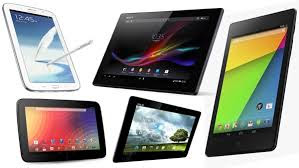
How to Select the Best Android Tablet


    In the time of cutting-edge cell phones and tablets, Android energized contraptions have adequately made sense of how to cut a novel identity for them. All the Android controlled devices are commended for their straightforward interface and also the disgraceful applications and diversions open with them. In spite of the way that these applications were by then a bit of many propelled cell phones that went before Android, these were adequately expensive that few out of every odd individual could bear the expense of them. With the introduction of Android-powered propelled cell phones and tablets in the market, this entire extent of untouchable entertainments and furthermore applications ended up being more open to the customary masses. 

Android tablets have used over various tablets available in the market. These tablets are filled with a champion among the most fantastic and adaptable working systems open today i.e. Android itself. These are uncommonly flexible moreover. The steady quality and furthermore astounding features given by Android is the inspiration driving why a bit of the vehicle makers on the planet are in like manner enthusiastic about it, so they can find something accommodating and associating with for their customers. 

Expressly discussing Android tablets, a radical new extent of tablets has exploded in the propelled market. Besides this, the new extent of usages and preoccupations that run with these tablets are also admirable. In any case, all of these choices can put people in tremendous circumstance. To make it more straightforward for everyone to successfully and shrewdly placed assets into an Android tablet, underneath are a couple of factors which should be recollected before placing assets into an Android energized tablet. With the true objective to settle on a sharp decision, look down and research a segment of the concentrations to be recollected before acquiring an Android tablet. 

1. Reason/Usage of tablet 

Inquisitively, a broad assortment of tablets is open under the Android arrange. These range from utility tablets for grown-ups to the simple to utilize and educative tablets for youngsters. The Kid's Safe Tablet is specially planned for kids with the end goal to help them in various educative activities connected with their instructive projects. It will in general be used to play diversions and understanding questions as well. In like manner, there are the standard more prominent and more clever tablets inferred for grown-ups. These tablets are as beneficial as a certain workstation. 

The benefits of picking separate tablets for you and your youngsters is that it will completely diminish the wear and tear which kids as often as a possible leave on their parent's tablets. Along these lines, the underlying advance is to choose the explanation behind which you are expecting to place assets into an Android tablet. 

2. Size of the tablet 

In the wake of choosing the explanation behind placing assets into an Android tablet, the consequent stage is to pick the degree of the tablet. Luckily, Android controlled tablets are available in a collection of sizes. A champion among the most captivating and furthermore ideal assurance about a tablet is that it is diminished in size. The smooth arrangement and keen worked of a tablet is what makes them easy to pass on and care for. While it is hard to tolerate a PC and since PCs are colossal in size, tablets are what acted the saint. 

The 7-inch tablets from Android are way more affordable than various diverse tablets available in the market. In any case, if you are enthusiastic about playing redirections and using applications on your tablet, those 10-inch tablets are essentially perfect for you. While more diminutive tablets are definitely not hard to hold up under, more noteworthy ones have a lot of purposes of intrigue moreover. For instance, watching movies and playing preoccupations is something that can be accommodatingly cultivated on a noteworthy tablet. Since Android tablets can be exceptionally adjusted, more noteworthy tablets make the whole experience all the more enchanting and spellbinding for the customers. Along these lines, the second factor to be recalled while picking the right Android filled tablet is the range of the tablet. 

3. The right Android working structure 

Like iOS, distinctive versions of the Android working system are moreover open. All of these types of Android have their own one of a kind course of action of features. Starting from the explicit first type of Android i.e. Android 1.5 (Cup Cake), there are 8 more structures open. The most starting late impelled variation of Android is the Android 4.4 (Kit Kat). It is totally the buyer's decision that which type of Android he/she needs in his/her tablet. In like way, their tablet will play out all of the limits which are offered inside the degree of that explicit adjustment of Android. 

Also, there are certain applications and moreover amusements which are outstanding to each adjustment and they may/may not be upgradable to the higher ones. In this manner, each buyer should be careful while obtaining a tablet with Android 2.3 or underneath. The clarification for this is these structures don't reinforce Flash. It is told to pick the fitting adjustment concerning Android insightfully. This ought to be conceivable reliant on the customer's tendencies and moreover the reasons for buying a tablet. 

4. The right maker 

Looking pervasiveness and fan following of Android tablets in the market, there are a couple of perhaps momentous tablet creators in the modernized present reality. The issue develops in light of the way that all of these tablets justifies putting your hands on. Makers like Sony, Google, Samsung, etc have created as comparatively astonishing suppliers of Android controlled tablets on the planet. 

In any case, it may not be that difficult to pick between these tablets. The clarification for this is all of these creators has some additional features and may work contrastingly as well. Accordingly, the most ideal approach to concentrate in on any Android tablet is by being sure about the features and conclusions that you would like to be there in your tablet. 

5. What's your budgetary arrangement? 

The cost of an Android tablet depends upon the version of the Android working structure presented and furthermore the features offered by it. The distinctive parts which contribute in the last expense of a tablet fuse the working system, features, gathered, plan, utility and furthermore the size. While smaller tablets are undeniably more affordable than the more prominent ones, it solely depends upon the customer's necessities and spending plan. 

6. Does your tablet interface with the Android promote? 

Unfortunately, just a single out of each odd Android controlled tablet can be related with the online Android publicize. This is in light of the fact that Google does not have much control on Android. At the point when another adjustment of Android is released to the larger part, there is no other choice for Google. In any case, Google decidedly has the specialist over the entire Android feature. From this time forward, more settled adjustments of Android, for instance, Android 2.2 and underneath will never connect with the Android promote. Apparently, a few applications will be open to you, yet the bigger piece of utility applications and preoccupations will be far out of your range. 

You ought to consider the significance of acquiring an Android tablet in case you can't approach every one of the applications and entertainments in the Android promote. Along these lines, this is another imperative factor to be recalled while buying any Android controlled tablet. 

7. Tablets may/may not require a data plan 

All Android tablets can be either sold with Wi-Fi organize or with 3G/4G remote data get to. As often as possible it is seen that these tablets are sold at a discount an incentive because of their joint exertion with any cell pro association. Before placing assets into an Android tablet, check if you are anchored under the 2 years of a portion over the expense for which you are obtaining your tablet. Moreover, check the proportion of data that you will be given under this game plan. It is continually urged to go for a plan which is expandable in the future. 

8. Say no to Modified Androids 

Like the changes got Android UIs in different contraptions by their producers, adjustments can be procured Android tablets as well. Routinely producers express that it is an imminent thing, anyway it in like manner has a couple of weights. 

The disadvantage is that these changed structures routinely act exceptionally as opposed to their authentic interpretations. This may speak to a troublesome condition for people using the adjusted type of Android. In this manner, you should reliably go for the real and extraordinary variation of Android. 

Placing assets into the right Android tablet is definitely a troublesome decision to make. Nevertheless, when you place assets into the right tablet, there will be no reasoning back for you.
 
Copyright © 2014 For You

Powered by JoJoThemes